

December 15, 2025
⯀
15
min


Choosing the right tech stack for your startup app is critical to balancing speed, cost, and scalability. Here’s how you can make the process simpler:
Quick Tip: Start simple with a monolithic architecture and scale components later as your user base grows. Secure your app with HTTPS, OAuth 2.0, and regular vulnerability checks.
Before you dive into selecting a technology for your app, take the time to clearly define both your app type and your business needs. For instance, is your app a consumer-facing social platform, a B2B SaaS dashboard, a two-sided marketplace, or an on-demand delivery service? Each type comes with its own set of technical requirements. Social apps need features like real-time messaging and low-latency backends. SaaS platforms demand multi-tenancy and seamless integrations. Marketplaces must be equipped to handle secure payments and traffic surges during peak times. Knowing these specifics is crucial to making informed decisions.
Who will use your app, and what problem will it solve for them? These questions are essential in shaping your approach. For example, if you're targeting premium U.S. users and aiming for higher revenue, launching on iOS might be the smarter choice. On the other hand, Android dominates roughly 80% of the global smartphone market, making it a better option for broader international reach.
Next, outline the essential features for your Minimum Viable Product (MVP). Think about core functionalities like authentication, notifications, payments, and search. A fitness app that relies on real-time GPS tracking will have entirely different technical priorities than a content marketplace centered on search and discovery. Defining these needs upfront ensures you select technologies that can scale efficiently - from 1,000 users to 100,000 - without costly overhauls.
Your budget will play a significant role in shaping your options. For instance, if you're working with less than $50,000, cross-platform frameworks like React Native or Flutter can reduce costs by 30-50% compared to building separate native apps for iOS and Android. Similarly, if you're aiming for a 3-6 month launch timeline, consider your team's existing skills. Developers already familiar with JavaScript can move faster with a MERN stack than by learning a completely new language.
Local hiring markets also matter. In the U.S., React and Node.js developers are relatively abundant, with salaries ranging from $120,000 to $180,000 annually. However, finding developers with more specialized skills can be more challenging. By keeping your budget, timeline, and team expertise in mind, you can set realistic goals and focus on what matters most.
Decide what’s most important at your current stage. For early-stage startups, speed to market is often the top priority. Getting an MVP into users' hands quickly allows you to test assumptions and gather feedback. As Brock Jones, CEO of Bambii, explained, his development team approached complex tasks with "a scalable, well-thought-out strategy". This highlights the importance of balancing quick delivery with long-term scalability.
To stay focused, try ranking your priorities. For example, you might assign weights like speed (40%), scalability (30%), performance (20%), and security (10%). This approach helps you avoid over-engineering while still leaving room for growth as your user base expands.
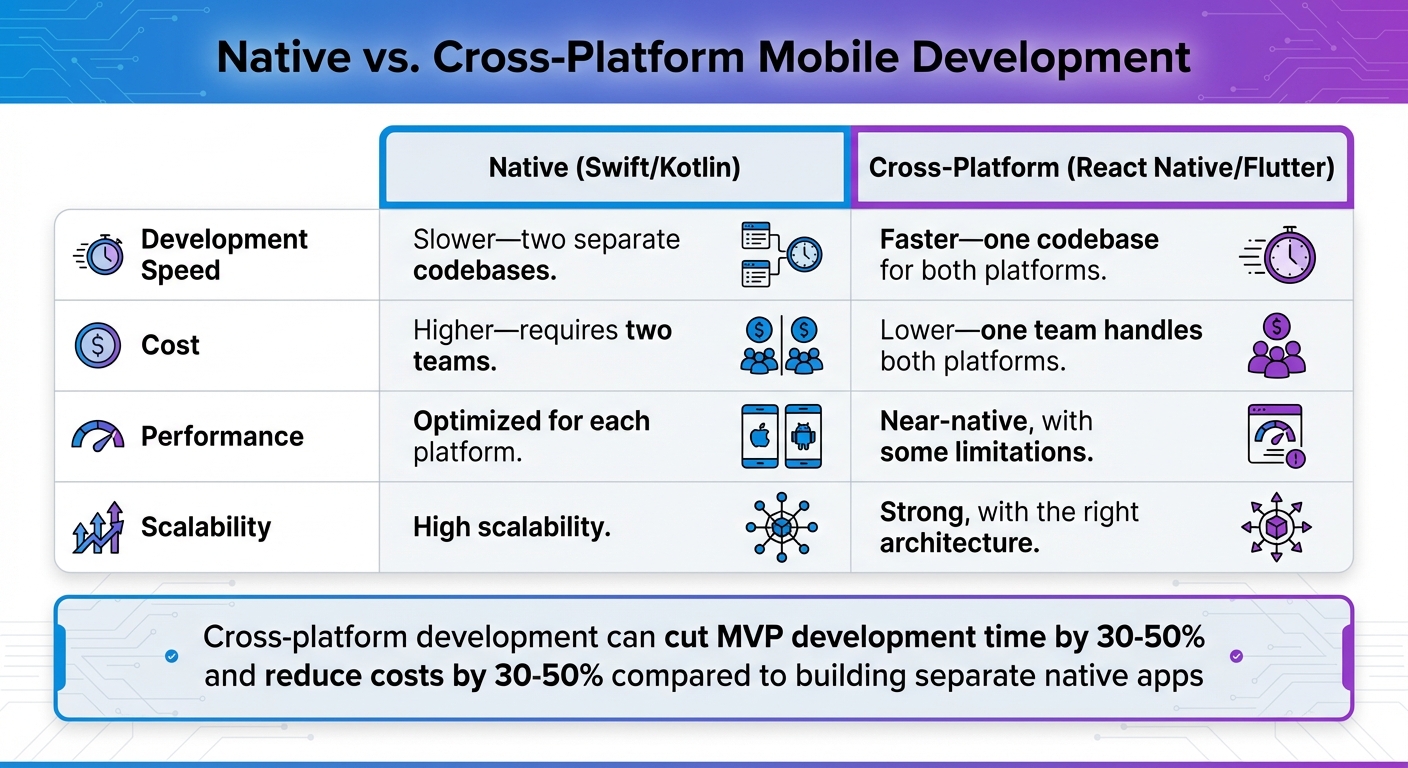
Native vs Cross-Platform Mobile Development Comparison Chart
Once you’ve nailed down your product needs and business requirements, the next step is to choose the technology layers that will form the backbone of your app. These layers - mobile development, backend/APIs, and data storage/infrastructure - should align with your priorities, whether that’s speed, cost, performance, or scalability.
When it comes to mobile apps, you can go one of two ways: native development or cross-platform development. Let’s break it down.
Native development means building separate apps for iOS and Android using Swift and Kotlin (or Java), respectively. The upside? You get the best performance and full access to platform-specific features. The downside? You’ll need to maintain two separate codebases, which can drive up both time and cost.
Cross-platform frameworks like React Native (JavaScript-based) and Flutter (Dart-based) let you create a single codebase that works on both iOS and Android. This approach can cut development time for your MVP by 30–50% and still deliver performance close to native. However, it may fall short for highly complex UI designs or when deeply integrating platform-specific features.
Here’s a quick comparison to help you decide:
| Criteria | Native (Swift/Kotlin) | Cross-Platform (React Native/Flutter) |
|---|---|---|
| Development Speed | Slower - two separate codebases | Faster - one codebase for both platforms |
| Cost | Higher - requires two teams | Lower - one team handles both platforms |
| Performance | Optimized for each platform | Near-native, with some limitations |
| Scalability | High scalability | Strong, with the right architecture |
If you’re working with a tight budget and need to launch quickly, cross-platform development can be a smart choice. It’s cost-effective and still delivers a dependable product.
The backend is the engine of your app, handling business logic, data processing, and communication between the app and its database. For startups, some popular backend frameworks include Node.js, Django (Python), and Spring Boot (Java).
Here’s how they compare:
| Framework | Learning Curve | Scalability | Ecosystem Maturity | Best For |
|---|---|---|---|---|
| Node.js | 9/10 (easy for JS devs) | 8/10 | 9/10 | Real-time apps, fast development |
| Django | 8/10 | 8/10 | 9/10 | Data-heavy apps, quick prototyping |
| Spring Boot | 6/10 (steeper learning curve) | 9/10 | 9/10 | Enterprise apps, high-load systems |
JavaScript-based frameworks like Node.js are particularly attractive in the U.S., where developer availability supports rapid team expansion.
Your choice of database depends on your app’s data structure and query needs. Here are two strong contenders:
For hosting, platforms like AWS and Google Cloud provide managed services that minimize operational headaches, allowing you to focus on building features.
Canyon Dell'Omo, Founder and CEO of WorkerSense, shared his experience working with a development team on backend infrastructure: "Precisely adhered to budget and timeline, even with some unplanned changes introduced through the project".
Ultimately, whether you choose a relational database like PostgreSQL or a NoSQL option like MongoDB will depend on your app’s specific needs. Apps requiring structured transactions will benefit from PostgreSQL, while MongoDB offers the flexibility needed for rapid iteration.
At Dots Mobile (https://dots-mobile.com), we specialize in both native and cross-platform mobile app development, supported by strong backend and infrastructure solutions. Our goal? To deliver a tech stack that meets your immediate needs while preparing you for future growth.
Moving from research to implementation requires a clear, structured process to ensure your tech stack aligns with your startup's business goals. These steps will help you make informed decisions that support long-term growth and scalability.
Start by outlining the essential features your application needs, such as authentication, payment processing, or real-time updates. Add non-functional requirements like fast response times (e.g., under 2 seconds), handling 10,000 concurrent users, or meeting specific data privacy standards.
Once you’ve listed your requirements, match them to potential tech stack options. For example, if performance and complex animations are priorities, investing in native development with Swift and Kotlin could be the right choice. On the backend, you might lean toward Node.js for real-time functionality or Python/Django for data-intensive tasks.
Don’t forget to consider your team’s expertise and the availability of local talent. For example, in the U.S., JavaScript developers are widely available, which can simplify hiring. If your team already has experience with React, pairing it with Node.js for the backend can streamline workflows and reduce the learning curve.
With these factors in mind, map each tech stack option to your requirements and score them objectively to narrow down your choices.
A scoring matrix is a practical way to compare your options without bias. Create a table with tech stack options listed in rows and evaluation criteria in columns. Common criteria include development speed, scalability, cost, team expertise, and talent availability. Assign weights to each criterion based on your startup’s priorities. For instance, you might prioritize scalability at 30%, development speed at 25%, cost at 20%, talent availability at 15%, and performance at 10%.
Rate each tech stack on a scale of 1 to 10 for each criterion, multiply by the assigned weights, and calculate the total score. For example, a React Native/Node.js/PostgreSQL stack might score 8.7 overall due to its speed and cost efficiency, while a native Swift/Java/AWS setup might score 7.9, excelling in scalability but falling short on speed and cost.
Choosing well-supported, popular technologies can also save time. These ecosystems often come with pre-built libraries and tools, reducing custom development work by up to 40%.
Once you’ve identified your top options, the next step is to validate them through prototyping and testing.
Develop a basic end-to-end prototype in 1–2 weeks, focusing on the riskiest components. This could include high-traffic endpoints, third-party integrations like payment systems, or critical user flows. To keep costs low, use platforms like AWS Free Tier or Heroku.
Stress test your prototype by simulating five times the expected traffic. Measure response times (aim for under 200 milliseconds) and track error rates (keep them below 1%). This testing phase ensures your stack can meet the performance and scalability benchmarks set earlier. If the prototype exceeds your budget by 20% or fails critical tests, it’s better to pivot now than after full development begins.
Another key aspect to test is the developer experience. Assess how quickly your team can set up the environment, build a feature, and deploy it to staging. If the process is cumbersome or slow, it’s a warning sign. A smooth prototype phase not only confirms technical feasibility but also sets the stage for efficient full-scale development.
At Dots Mobile (https://dots-mobile.com), we specialize in helping startups validate their tech stack decisions through MVP prototyping and rigorous QA testing. Whether you’re exploring Swift and Kotlin for native apps or comparing cross-platform frameworks, we ensure your stack meets both technical and business requirements before you dive into full development.
Once you've validated your idea, it’s time to build an app that can handle growth while staying secure and easy to maintain. A carefully planned approach ensures your app performs well, stays protected, and remains manageable as your user base expands.
Scalability is all about designing your app to handle increasing users, data, and traffic without needing a complete overhaul. Start with a modular architecture that separates key components - like an API layer, business logic, and data access. This setup allows you to scale individual pieces independently as demand grows. It also aligns with the flexible tech stack choices you may have already considered.
In the early stages (12–24 months), a simple monolith is often the quickest and most practical solution. For instance, a single Node.js or Django app behind a load balancer can handle growing traffic by adding more instances. This approach avoids the complexity of multiple services until you've achieved market fit. Later, as your user base grows, you can separate high-traffic features - like notifications, billing, or recommendations - into standalone services without disrupting the core app.
For specific tasks, consider serverless functions for event-driven operations and containers for isolated, portable deployments. Use a managed database like Amazon RDS (PostgreSQL or MySQL) paired with a caching layer such as Redis or Memcached to handle read-heavy operations efficiently. A load balancer with autoscaling policies and a CDN will help reduce latency across the U.S. Meanwhile, basic observability tools like metrics, logs, and alerts will let you monitor performance and address issues before they affect users.
Security is non-negotiable, especially when dealing with sensitive user data. Start with HTTPS/TLS for all communication between your app and backend APIs. Enable HSTS and reject weak ciphers to ensure data in transit is secure.
For authentication, stick to trusted protocols like OAuth 2.0 and OpenID Connect instead of creating custom solutions. Frameworks like React Native and Flutter offer excellent OAuth libraries that take advantage of native features. Avoid storing passwords in plain text - use strong hashing algorithms with salts. Follow the principle of least privilege for database and cloud credentials, and store secrets in a secure vault rather than in source control. Regularly update frameworks, libraries, and operating systems, and keep an eye on vulnerability feeds. For mobile apps, safeguard API keys, use certificate pinning when needed, and avoid storing sensitive data unencrypted on devices.
Incorporate security into every stage of development. During design, identify potential risks for key features like payment flows or account recovery. During coding, use secure practices like input sanitization and parameterized queries to prevent SQL injection and XSS attacks. Integrate tools like static application security testing (SAST) and dependency scanning into your CI pipeline to catch vulnerabilities early. In QA, test for role-based access, rate limits, and brute-force scenarios. Monitor logs for unusual patterns like spikes in failed logins or suspicious IP addresses. Having an incident-response plan in place will also strengthen your security measures.
Once your app is scalable and secure, focus on keeping things efficient for the long haul. Clear documentation is a must. Maintain version-controlled architecture diagrams that outline components and their roles. Each service or module should have a concise README with details like tech choices, setup instructions, key environment variables, and testing commands. For APIs, tools like OpenAPI or Swagger can automatically generate documentation, making integrations seamless for mobile and web teams.
Automated testing and strong CI/CD pipelines are essential for long-term success. Automated tests catch issues early, while continuous integration ensures every code change is built, tested, and validated automatically. This setup allows your team to release new features confidently and roll back changes quickly if needed, minimizing downtime and disruptions for users.
At Dots Mobile (https://dots-mobile.com), we specialize in building apps with rock-solid code and scalable architectures. As one of our clients, Brock Jones, CEO at Bambii, shared:
"They set clear expectations, delivered everything ahead of schedule and within budget, and approached complex tasks with a scalable, well-thought-out strategy."
Our thorough QA process - including test planning, execution, and defect tracking - ensures your app remains reliable and adaptable as your business grows.
Choosing the right tech stack for your startup app is no small task, but a thoughtful and structured approach can make all the difference. Begin by defining your product and business requirements - clarify your app's purpose, identify your target audience, and set realistic expectations for budget, timeline, and team capabilities. With these in mind, evaluate mobile, backend, and data storage options to find the best fit. Wrap things up by reviewing your criteria, weighing your options objectively, and testing your choice with a quick prototype to confirm it works as intended.
Once your stack is selected, think ahead. Focus on building an app that's not only functional but also secure, scalable, and easy to maintain. Incorporate features like modular architectures, HTTPS/TLS encryption, and OAuth 2.0 protocols from the start. Don’t overlook the importance of clear documentation, automated testing, and CI/CD pipelines to streamline development and ensure smooth updates.
For startups without extensive technical expertise, teaming up with an experienced development partner can be a game-changer. At Dots Mobile (https://dots-mobile.com), we bring over a decade of mobile app development experience to the table. From UI/UX design to iOS/Android development, backend solutions, QA, and even App Store optimization, we handle it all. Using technologies like Swift, Kotlin, Python, and Node.js, we create scalable and user-friendly apps tailored to your business goals and budget.
Ultimately, selecting the right tech stack is about aligning your technology choices with your startup’s unique needs and future ambitions. By following a disciplined process, validating your decisions early, and planning for scalability, you’ll give your app the best chance to thrive in a competitive market.
When deciding between native and cross-platform app development, it's important to weigh factors like your app’s complexity, performance needs, budget, timeline, and long-term plans.
Native development is the go-to choice for apps requiring top-notch performance, advanced features tied to specific devices, or a smooth, polished user experience. This approach uses platform-specific programming languages - like Swift for iOS or Kotlin for Android - ensuring optimal functionality. However, it comes with higher costs and longer development times since you'll need separate codebases for each platform.
On the other hand, cross-platform development offers a more affordable and faster alternative. With a single codebase that works across multiple platforms, it’s a practical option for simpler apps or when working within tight budgets and deadlines. Keep in mind, though, that this approach may not fully utilize all the unique features of each platform.
Take a close look at your app’s goals, requirements, and priorities to decide which development path aligns best with your startup’s vision.
To prepare your tech stack for growth as your user base increases, focus on building a scalable infrastructure. Cloud-based services and a modular or microservices architecture are great options. These strategies make it easier for your app to handle more traffic and added features without requiring major system overhauls.
Pay attention to your database performance by selecting systems that are built to scale effectively. Tools like React Native or Flutter can simplify cross-platform development, making updates and maintenance more efficient. Regular performance monitoring and planning for infrastructure upgrades will help your app grow smoothly.
Finally, always aim for clean and maintainable code. This practice not only keeps your development process efficient but also ensures that scaling your app over time is much less complicated.
To safeguard your startup app right from the start, prioritize strong security measures such as:
On top of that, make it a habit to perform regular security testing to uncover potential weak spots and keep an eye out for any unusual activity within your app. By embedding security into your app from the very beginning, you help protect both your users and your business.


