

December 11, 2025
⯀
12
min


Voice User Interfaces (VUIs) let users interact with apps using speech instead of taps or swipes. They’re ideal for multitasking, accessibility, and hands-free scenarios like driving or cooking. With advancements in speech recognition and natural language processing, voice technology is now accurate, reliable, and widely adopted in mobile apps. Here’s a quick breakdown of how to design effective voice UIs:
Voice UIs make apps faster and more accessible while improving usability for all users. Follow these principles to create smooth, hands-free interactions that users will trust and rely on.
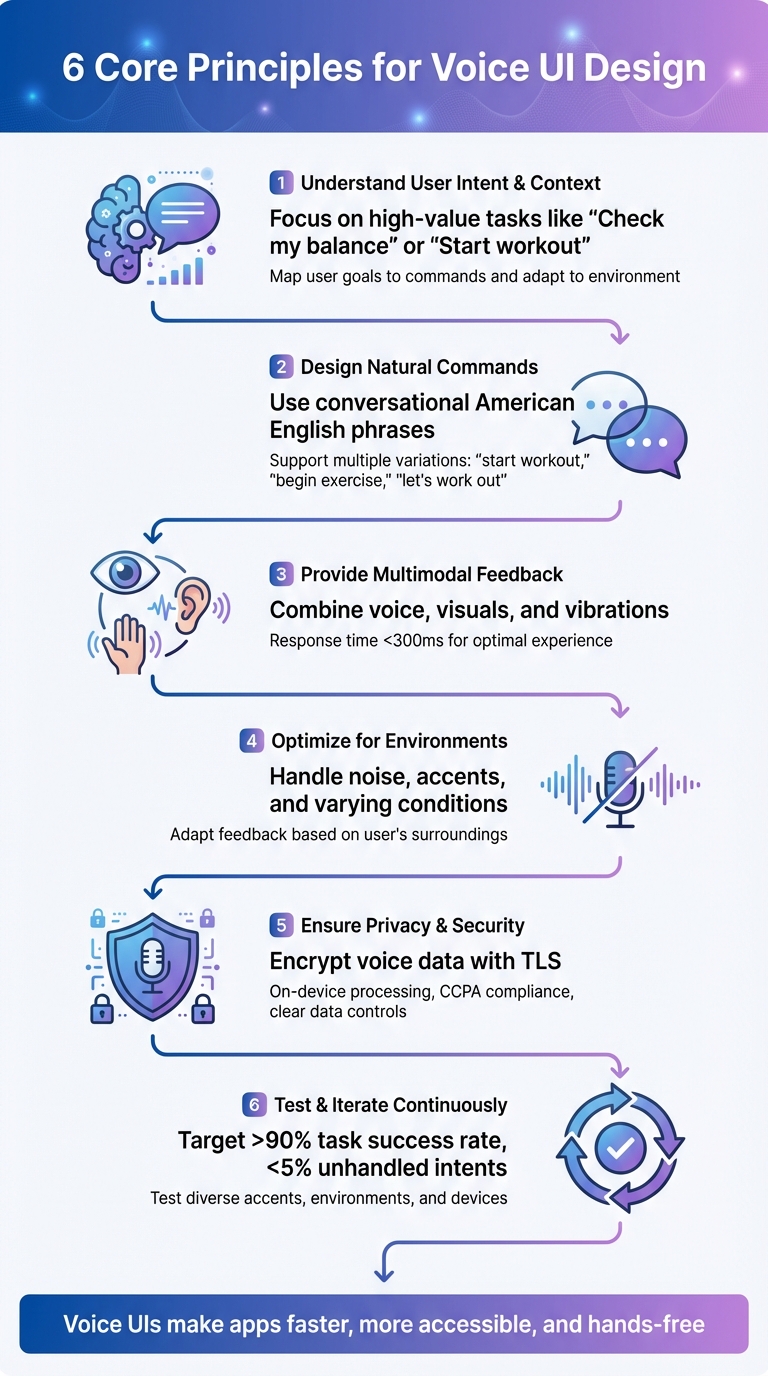
6 Core Principles for Effective Voice UI Design in Mobile Apps
When designing voice interfaces, start by focusing on what users want to accomplish and how voice interaction can make those tasks easier. Think about situations where hands-free access is essential - like driving, cooking, or working out - or when users need quick updates, such as asking, "What's my balance?" The goal is to target straightforward, high-value actions that reduce effort.
To achieve this, create an intent map that connects user goals with specific commands, required inputs (like dates or dollar amounts), and system responses. For U.S. users, consider common scenarios such as commuting, managing smart devices, or juggling tasks at work. For instance, a fitness app might prioritize commands like "Log 20 minutes of cardio", while a banking app could focus on simple tasks like balance inquiries instead of complex processes like loan applications.
Context is just as critical as intent. A well-designed system remembers recent interactions, adapts to the current environment, and accounts for external factors like background noise or user activity. For example, if the app detects a noisy coffee shop, it might switch to offering visual options instead of relying solely on voice. Similarly, recognizing whether a user is driving or at home allows the system to adjust its responses to minimize distractions. By carefully mapping both intent and context, you can create a voice interface that feels natural and efficient.
Voice commands should sound like natural American English, not robotic instructions. Use short, conversational phrases - for example, "Show my recent orders" feels much more user-friendly than "Retrieve historical transactions." Since users are already familiar with assistants like Siri, Alexa, and Google Assistant, aligning with these established patterns makes interactions smoother.
To make commands flexible, support multiple variations for the same action. For instance, phrases like "start workout", "begin exercise", and "let's work out" should all trigger the same response. You can gather these variations through user research, support logs, or early testing. When rolling out new features, provide example phrases to guide users - something like, "You can say, 'Track my steps' or 'How many steps today?'"
Keep prompts simple and direct. Avoid long, complicated instructions that users might forget, especially when they're multitasking. Use confirmations selectively and only when necessary - for example, "Got it, adding milk to your groceries" feels conversational and avoids excessive repetition. If the system misinterprets a command, offer specific guidance like, "I didn't catch that. Try saying, 'Show my latest transactions.'" These clear, natural interactions set the stage for a smooth user experience and prepare users for multimodal feedback.
Effective voice interfaces combine audio, visual, and haptic feedback to create a seamless experience. For example, when a command is received, the system might provide spoken confirmation, display a visual transcript or waveform, and offer a subtle vibration - all within 300 milliseconds to maintain responsiveness.
Visual feedback is particularly helpful for error recovery. Showing real-time transcriptions allows users to catch mistakes quickly. When the system is unsure about a command, it can present alternatives as tappable options - like "Did you mean play 'Workout Mix' or 'Work Playlist'?" - making it easy to switch between voice and touch without losing context.
Feedback should adapt to the user's environment. In noisy places, rely on screen displays; in vehicles, simplify cues to minimize distractions. To respect privacy in public settings, avoid reading sensitive information aloud. Instead, display it with a generic prompt like, "I've sent that to your screen." Allowing users to customize features - such as volume, speech rate, and vibration - enhances comfort and builds trust in the system.
When deciding on speech technologies, you have two main options: native frameworks and cloud services. Native frameworks like iOS Speech and Android SpeechRecognizer are great for quick, privacy-focused tasks. They can handle basic commands offline with minimal delay - usually around 300 milliseconds. On the other hand, cloud services such as Google Cloud Speech-to-Text and Amazon Lex bring advanced capabilities like intent detection and slot filling. These are better suited for handling complex queries but come with trade-offs: they require network connectivity, may experience delays in congested networks, and charge per request.
A hybrid approach often strikes the right balance. For instance, you can use on-device recognition for simple commands like "pause" or "next" while routing more complex queries to the cloud for deeper processing. If you’re targeting U.S. users, it’s important to use American English models and test for regional accents to ensure accuracy. Once you’ve chosen your technology, don’t forget to address real-world factors like noise and user environment to maintain performance.
Voice UIs need to function in a variety of real-world settings - whether it’s a bustling coffee shop, a noisy subway, or a windy street. To tackle these challenges, make use of your platform’s audio APIs to enable noise suppression and echo cancellation. Additionally, encourage users to position their devices optimally when in loud environments.
Your app should also adapt to the user’s surroundings. If voice recognition keeps failing, provide alternatives like touch input or suggest moving to a quieter location. In particularly noisy areas, offering live visual transcripts can help users spot and fix errors more easily. Keep prompts concise in noisy or safety-critical situations, while allowing more detailed interactions in quieter settings.
Once the technology is in place and optimized for different environments, safeguarding user privacy becomes critical. Voice data introduces unique challenges, so transparency is key. Only request microphone access when absolutely necessary, and make it clear when the microphone is active with a visible indicator. Avoid continuous background listening unless it’s essential.
All audio and transcripts should be encrypted during transmission (using TLS) and when stored. Sensitive tasks like wake-word detection should be processed on the device to limit the need for sending raw audio to external servers. For U.S.-based users, compliance with laws like the California Consumer Privacy Act is crucial. Provide clear information about how voice data is used and offer easy options for users to view, download, or delete their voice history. For especially sensitive information - such as health details or account balances - display the data on the screen instead of reading it aloud in public settings.
Before diving into development, start by crafting sample dialogs for the key voice tasks you want your system to handle. This involves mapping out the primary prompts, the variety of ways users might respond, confirmation messages, and fallback paths for when the system struggles to understand. Taking this conversation-first approach helps you pinpoint potential issues early on - since most user frustrations with voice interfaces stem from poorly designed conversations.
One effective method for early testing is the Wizard-of-Oz technique. Here, a human operator secretly controls the system, simulating a functional voice interface while participants believe they're interacting with the real thing. This approach allows you to observe how people naturally phrase their requests, where they hesitate, and which confirmations feel intuitive - all without needing to build the full system. Focus on realistic, time-sensitive scenarios to see where users get stuck, misinterpret prompts, or give up and switch to touch input.
To ensure your system works for everyone, include a diverse range of U.S. regional accents - Southern, New England, Midwest, West Coast - and account for varying speech rates and patterns. Test in different environments as well, like indoors, outdoors, or inside a car, to reflect real-world usage. Record audio, capture screen interactions, and ask participants to think out loud as they navigate the tasks. Then, categorize the issues you uncover into specific areas like recognition errors, unclear prompts, missing intents, or insufficient multimodal feedback.
These insights will become the foundation for refining your voice UI design in the next stages.
Once your voice UI is live, the task success rate becomes the primary metric to track. This measures the percentage of voice-initiated tasks users complete without needing to switch to touch or human assistance. It’s a direct indicator of how well your design is working. Break down task completion and error rates at each step of the dialog to identify issues like unrecognized utterances, misinterpretations, or "no match" events. Analyze these metrics by device type, operating system version, and environment to pinpoint performance trends.
Another key metric is the average number of turns per task, which reflects how many back-and-forth exchanges users need to complete an action. A high number of turns might indicate confusing prompts or poor handling of user context. Additionally, compare the time it takes to complete tasks using voice versus touch. Ideally, voice interactions should be faster - or at least equally efficient - especially for hands-free scenarios.
User satisfaction is also critical. Gather feedback through in-app surveys and track how many users rely on voice commands at least once a week. A drop in engagement could signal trust or reliability issues with the system.
To measure all of this effectively, set up analytics to fire events at every crucial dialog step. For example, log when an intent is detected, a confirmation is displayed, an error occurs, or a task is completed. Tie these events to anonymized session IDs to maintain user privacy while ensuring you can analyze patterns.
Once your voice UI is up and running, continuous improvement is essential to keep it efficient and user-friendly. Define clear targets for your core metrics: aim for a task success rate above 90%, keep unhandled intent rates below 5%, and try to maintain an average of fewer than four dialog turns for key tasks. Monitor these metrics weekly and set alerts for sudden spikes in error rates after updates, so you can quickly investigate or roll back changes if needed.
Schedule monthly voice UX reviews to analyze logs, audio samples, and systemic issues. Maintain a backlog of anonymized utterances to retrain or fine-tune your models regularly, ensuring they adapt to evolving language trends and seasonal patterns. For instance, in the U.S., you might need to adjust for holiday-specific tasks during November and December.
Funnel analysis can also help you identify where users abandon tasks or switch to touch input. If you notice repeated drop-offs at the same step, it could mean prompts are unclear or key information is missing. Review transcripts for phrases users frequently say but the system doesn’t understand - these can guide you in creating new training utterances or intents. If the system struggles with specific terms like product names or street addresses, consider updating pronunciation dictionaries or using custom language models.
Finally, compare performance across different environments, accents, and devices to identify technical gaps. For example, you might uncover issues with noise handling or biases toward certain speech patterns. Addressing these gaps ensures your voice UI remains reliable and accessible for all users.
Creating an effective voice user interface (UI) hinges on six key principles: understanding natural speech patterns, designing clear and conversational prompts, incorporating multimodal feedback (audio, visuals, and haptics), optimizing for background noise and diverse accents, ensuring privacy and security in data handling, and prioritizing accessibility for all users. When these principles are applied, voice interactions become faster and more intuitive than touch for tasks like checking account balances, scheduling appointments, or logging workouts hands-free. This framework ties directly to the practical strategies discussed earlier.
Voice UI enhances both efficiency and inclusivity. For users with motor impairments, repetitive strain injuries, or low vision, hands-free controls and spoken guidance offer critical support. Multimodal feedback - combining spoken confirmations, on-screen captions, and haptic cues - ensures clarity even in noisy environments like a bustling coffee shop or during multitasking at home. This layered approach minimizes confusion, builds user trust, and aligns with accessibility standards commonly expected in the U.S.
Success in voice UI design requires close collaboration across design, development, and quality assurance (QA) teams. Designers should map out conversation flows and potential error paths before finalizing screens. Developers need to integrate reliable speech technologies, reduce latency to under 300 milliseconds, and implement robust privacy measures like on-device processing or encrypted data streams. QA teams play a critical role by testing across various U.S. accents, devices, and environments using realistic scenarios. Shared resources such as conversation scripts, intent maps, and error taxonomies ensure all teams stay aligned and focused on delivering a seamless user experience. These collaborative efforts pave the way for continuous improvement.
Tracking metrics like task completion time, error rates, and user satisfaction helps guide refinements. Applications that outperform touch interfaces for speed, handle mispronunciations effectively, and provide actionable error messages keep users engaged and loyal. Regularly analyzing data and refining prompts, expanding intents, and improving noise handling are essential for long-term success.

Dots Mobile offers comprehensive mobile app development services that seamlessly integrate voice UI into the overall user experience. Their UI/UX designers specialize in crafting intuitive conversation flows and multimodal feedback systems, while their iOS and Android engineers build scalable app architectures with advanced voice capabilities. By leveraging cutting-edge speech APIs and conducting rigorous testing, Dots Mobile ensures smooth integration of voice features into your app. With expertise in creating AI-powered fitness, beauty, and lifestyle apps, they can help you design natural voice commands - for example, spoken workout instructions or hands-free beauty routines - that align with local preferences and improve both usability and accessibility. Let Dots Mobile guide you from concept to launch, reducing friction and enhancing the user experience through thoughtful voice UI design.
To protect user privacy and maintain security in your app's voice interface, prioritize end-to-end encryption for all voice data. This ensures that the data remains secure throughout its journey. Additionally, implement strict access controls to prevent unauthorized access. Stay ahead of potential threats by regularly updating your app's security measures and ensuring compliance with privacy laws like GDPR and CCPA.
Transparency is just as important. Clearly communicate how user data is collected and used. Always seek explicit consent before collecting voice data, and give users control over their information by offering options to manage or delete it. These practices not only safeguard sensitive data but also foster user trust.
To make sure your voice UI works effectively across different accents and settings, start with a diverse collection of voice datasets during training. Include user testing with individuals who speak in various accents to uncover any recognition challenges. Also, replicate real-life conditions like background noise or fluctuating audio quality to see how the interface performs under these circumstances. These efforts contribute to building a voice experience that's more inclusive and dependable for everyone.
When deciding between native frameworks and cloud services for voice recognition, the best choice depends on what your app needs to achieve. Native frameworks shine when you need top-notch performance, smooth integration with the device, or offline capabilities. Meanwhile, cloud services are a strong option if scalability, quick updates, and a shorter development timeline are priorities.
Your decision should also factor in your budget, project deadlines, and how much effort you're willing to put into long-term maintenance. If your app must handle voice commands without relying on an internet connection, native frameworks are the way to go. But if your app demands cutting-edge features or regular updates, cloud services could be the better fit.


