

June 10, 2026
⯀
18
min


When deciding how to build your app, you’ll typically choose between Native Apps, Hybrid Apps, and Progressive Web Apps (PWAs). Each option has its strengths and limitations, and the right choice depends on your goals, budget, and user needs.
| Feature | Native Apps | Hybrid Apps | PWAs |
|---|---|---|---|
| Performance | High (hardware-optimized) | Moderate (WebView overhead) | Browser-dependent (fast load) |
| Development Cost | High (separate codebases) | Medium (single codebase) | Low (web technologies) |
| Time-to-Market | Long (store approvals) | Medium | Short (no store wait) |
| Device Features | Full access | Partial (via plugins) | Limited (web APIs) |
| Updates | Store approval needed | Store approval needed | Instant (server-side) |
| Best For | Gaming, AR, secure apps | MVPs, business apps | E-commerce, content platforms |
Choose Native Apps for performance-heavy tasks, Hybrid Apps for budget-conscious cross-platform needs, and PWAs for cost-effective, fast-to-deploy solutions. Each option aligns with specific business goals, so weigh your priorities carefully.
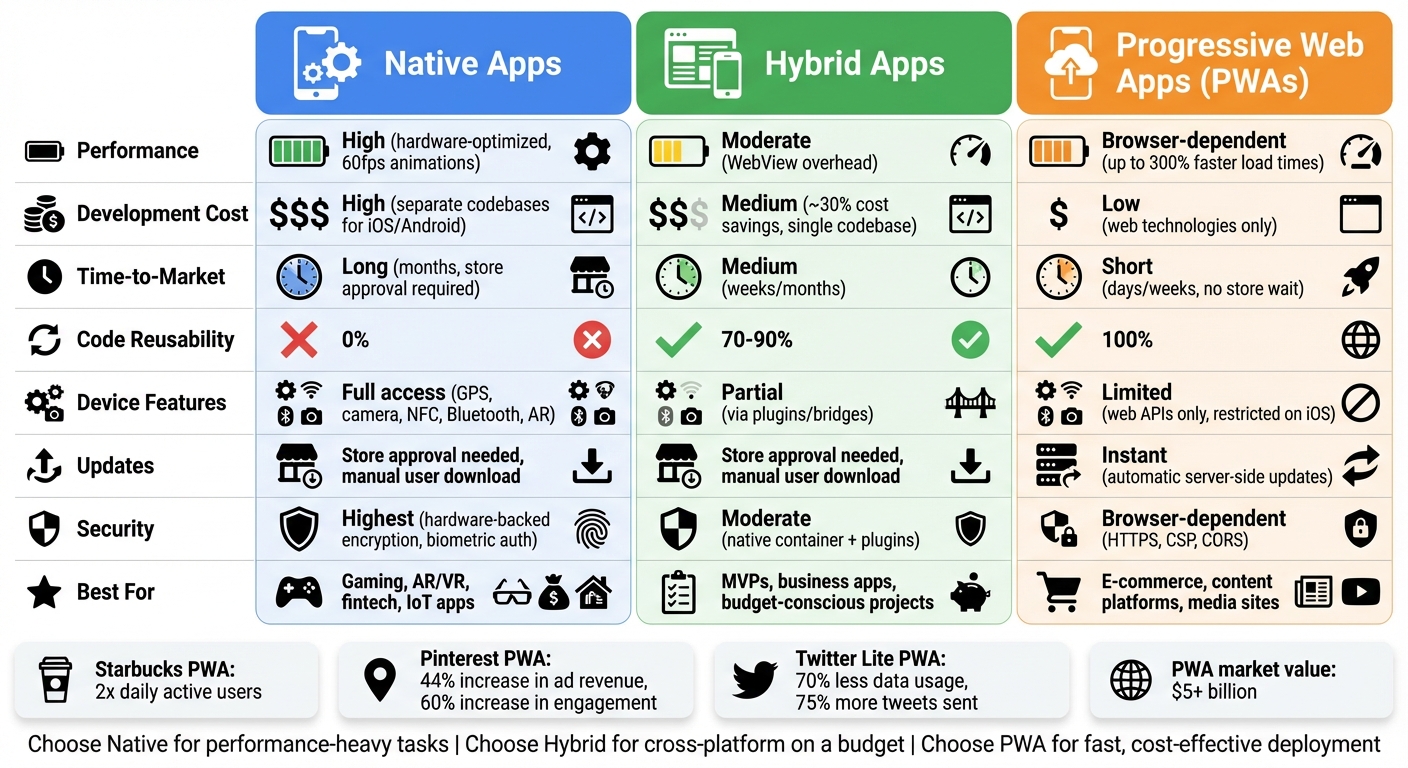
PWA vs Native vs Hybrid Apps Comparison Chart
Progressive Web Apps (PWAs) are web applications built with standard web technologies, designed to deliver a native app-like experience. They stand out because they can be installed directly from a browser, function offline, and send push notifications - all without requiring users to download them from an app store.
"PWAs are web applications designed to work on any standards-compliant web browser on both desktop and mobile devices." – Sauce Labs
PWAs achieve their functionality through several key technologies. They use service workers to enable offline access and push notifications, a web app manifest to integrate with home screens, and HTTPS to ensure secure communication. Unlike traditional apps, PWAs automatically update whenever the server content is refreshed, making them incredibly user-friendly and efficient.
While users can install PWAs straight from their browser, developers can also package them for platforms like Google Play or the Microsoft Store to increase visibility. This flexibility, combined with automatic updates, makes PWAs a cost-efficient and fast-to-deploy solution for businesses.
PWAs bring a host of benefits but also come with some constraints. One of their biggest strengths is their cost efficiency and speed of development. With a single codebase that works across iOS, Android, and desktop platforms, developers save both time and money compared to building separate native apps. This unified approach eliminates app store fees and lengthy approval processes, allowing for instant deployment and seamless updates. Another perk? PWAs are searchable by search engines, giving them an SEO edge that native apps typically lack.
The real-world impact of PWAs is impressive. Take Starbucks, for instance. After launching its PWA in 2017, the app became significantly smaller in size and doubled its daily active users. Pinterest saw a 44% boost in ad revenue and a 60% jump in core engagements after adopting a PWA. Twitter Lite, another success story, reduced data usage by 70% while increasing Tweets sent by 75%, all while taking up less than 1 MB of storage.
However, PWAs aren't without limitations. Advanced features like NFC and Bluetooth are still largely unavailable, especially on iOS. While basic functionalities like geolocation and camera access work well, PWAs might not be the best choice for demanding tasks like 3D gaming or augmented reality. Another drawback is that relying on browser engines can lead to higher battery consumption compared to native apps.
The gap between PWAs and native apps is shrinking, though. Recent developments, such as web push notifications on iOS 16.4 and expanded PWA support in Firefox version 143.0 (released in September 2025), are making PWAs more versatile. With the PWA market now valued at over $5 billion, they’re becoming an increasingly attractive option for businesses aiming to engage users effectively without the complexities and costs of native app development.
Native apps are designed specifically for a single operating system, using platform-specific programming languages - like Swift or Objective-C for iOS, and Kotlin or Java for Android. This tailored approach means developers create separate codebases for each platform, allowing these apps to deliver top-notch performance and functionality.
One of the standout features of native apps is their direct access to device hardware and operating system features through dedicated APIs. This allows them to take full advantage of tools like GPS, cameras, advanced sensors, NFC, and Bluetooth. Since they’re compiled into machine code, native apps are highly optimized for the hardware they run on, often achieving smooth, 60fps animations that make user interfaces feel seamless and responsive.
Another key strength is their adherence to mobile app UI/UX design principles. Native apps use familiar UI elements, ensuring that gestures and navigation feel intuitive to users. Unlike PWAs that run in browsers or hybrid apps that combine web code with a native wrapper, native apps are purpose-built for their respective platforms.
"Native apps remain the gold standard for companies that want to deliver a premium user experience on both iOS and Android devices." – Sauce Labs
Let’s dive into the performance benefits and challenges of native development.
Native apps are known for their unmatched performance, thanks to native compilation and hardware optimization. They excel at handling demanding tasks like 3D graphics, augmented reality, and intensive background processing. By interfacing directly with the device's GPU, they deliver high-performance visuals that are hard to rival.
"Native apps provide the highest performance since everything is natively compiled and optimized for the given device OS and hardware." – Zorbis
Security is another area where native apps shine. They leverage built-in protections like iOS App Transport Security, Android Keystore systems, and sandboxing, making them a great choice for applications requiring advanced security features. This includes biometric authentication, hardware-backed encryption, and even IoT applications that connect to devices via Bluetooth or NFC.
However, native development does come with its challenges. Building separate apps for iOS and Android often doubles the initial investment, as each platform requires its own specialized development team. The app store approval process can also slow down deployment timelines, and major app stores typically take a 30% commission on paid apps and in-app purchases. Another limitation is discoverability - since native apps aren’t indexed by search engines, their visibility depends heavily on effective App Store Optimization.
Hybrid apps bridge the gap between web and native applications. They’re built using web technologies like HTML5, CSS, and JavaScript but are wrapped in a native application shell. Essentially, these apps function as web apps housed within a native framework, offering users a more app-like experience.
"Hybrid apps are essentially web apps that have been put in a native app shell." - TechTarget
Here’s how they work: Hybrid apps use an embedded WebView to render their interface inside a native container. To interact with device hardware - like cameras, GPS, or contacts - they rely on a bridge to translate JavaScript commands into native APIs. This setup allows developers to create a single codebase that works across platforms like iOS and Android, significantly streamlining the development process. Popular frameworks such as React Native, Flutter, Ionic, and Xamarin make this cross-platform approach even more accessible.
Now, let’s dive into the pros and cons of hybrid app development.
One of the biggest draws of hybrid apps is their cost-effectiveness and faster development timelines. By using a single codebase, companies can cut development costs by about 30% and simplify maintenance since updates are centralized. This approach is especially appealing for startups testing Minimum Viable Products (MVPs) or businesses aiming to reach both iOS and Android users without needing separate development teams.
"Developing a hybrid app allows you to cut down on mobile app development cost, time, and resources which allows for more freedom in strategy and promotion." - Dalton Perry, Sales and Marketing, Zco
Another advantage is that hybrid apps are distributed through official app stores, which not only boosts brand visibility but also provides access to more device features compared to Progressive Web Apps (PWAs).
However, hybrid apps aren’t without their challenges. Performance often falls short of native apps due to their reliance on a WebView rendering layer. This can lead to slower load times and less smooth animations. For instance, a simple "Hello World" app built natively for Android takes up about 2.2 MB, while the same app built with React Native balloons to around 40.4 MB. Additionally, relying on third-party plugins to access device features can introduce compatibility issues and impact performance. If your app demands intensive tasks like 3D graphics, augmented reality, or heavy background processing, native development is likely the better route.
When it comes to performance, native apps lead the pack. Since they're compiled directly into machine code and have direct access to device hardware, they deliver top-tier performance. This means you get 60fps animations and seamless handling of resource-heavy tasks like 3D graphics and augmented reality.
PWAs (Progressive Web Apps), on the other hand, excel in speed, especially when optimized. Some versions boast up to 300% faster load times compared to standard mobile websites. However, they rely on browser capabilities, which limits their ability to handle heavy computational tasks. Hybrid apps sit between the two. They perform well for everyday use, but the WebView wrapper introduces some overhead, which can become noticeable in more complex scenarios.
| Approach | Performance Level | Best For | Limitation | Example |
|---|---|---|---|---|
| Native | Highest (Direct hardware access) | Gaming, AR/VR, complex animations | Requires separate codebases | - |
| Hybrid | Moderate (WebView overhead) | Business apps, MVPs | Performance drops with complexity | Basic app: ~40.4MB (React Native) vs. 2.2MB (native Kotlin) |
| PWA | Browser-dependent (Fast initial load) | Content platforms, e-commerce | Limited in compute-heavy tasks | - |
These differences in performance are key factors when choosing the right development approach for your project.
Developing native apps can be expensive and time-consuming. Since they require separate codebases for iOS and Android, you’re essentially doubling both development and maintenance costs. You’ll also need two specialized teams, and every update has to go through the app store approval process, which can slow things down.
Hybrid apps offer a more cost-effective alternative. With a single codebase wrapped in a native shell, you can reuse 70-90% of the code across platforms. This reduces development time while still allowing you to publish the app in stores. Meanwhile, PWAs are the most budget-friendly option. Built using standard web technologies, they bypass app stores entirely, enabling instant deployment.
"PWAs typically ship faster and at a lower total cost of ownership than maintaining separate native codebases".
| Factor | Native Apps | Hybrid Apps | PWAs |
|---|---|---|---|
| Development Cost | High (Multiple teams) | Medium (Single codebase + wrapper) | Low (Web technologies) |
| Time-to-Market | Long (Months; store approval) | Medium (Weeks/months) | Short (Days/weeks; no store wait) |
| Code Reusability | 0% | 70-90% | 100% |
| Update Process | Store approval required | Store approval required | Instant server-side |
These cost and time factors also influence the design flexibility and user experience, as we'll explore next.
Native apps don’t just deliver superior performance - they also offer an exceptional user experience. By using platform-specific UI components like Swift for iOS or Kotlin for Android, native apps create a polished and intuitive interface. Gestures, animations, and transitions feel natural because they’re tailor-made for the device’s operating system. This matters because users spend an average of 5.2 hours per day on smartphones, with 85-90% of that time dedicated to apps rather than browsers.
PWAs, while not as fluid as native apps, are consistent across platforms and excel in accessibility. They also load instantly, which is a major advantage for users.
"A PWA loaded from the home screen will be ready to launch in an instant".
Hybrid apps aim to bridge the gap between native and web-based approaches. By wrapping web code in a native shell, they deliver a decent balance of functionality and reach. However, UI rendering through web technologies can sometimes result in glitches or less smooth interactions compared to native apps.
Ultimately, the choice comes down to priorities: native apps focus on platform-specific polish, PWAs prioritize universal accessibility, and hybrid apps try to balance both, albeit with some trade-offs.
When it comes to tapping into a device's hardware, native apps are the gold standard. They have direct access to features like GPS, cameras, microphones, contact lists, sensors, Bluetooth, NFC, and even advanced tools like 3D graphics and augmented reality. This direct connection ensures they perform exceptionally well, especially for demanding tasks.
Hybrid apps, on the other hand, rely on native bridges to access hardware. This approach allows them to use features like GPS and cameras, but the translation layer between web and native code can slow things down. Meanwhile, PWAs are entirely dependent on web APIs. While they can handle core functions like geolocation, camera access, and push notifications, they fall short when it comes to advanced hardware like Bluetooth or NFC - particularly on iOS devices.
| Feature | Native Apps | Hybrid Apps | PWAs |
|---|---|---|---|
| Hardware Access | Full, direct access to all APIs | Access via native bridges/plugins | Limited to supported Web APIs |
| GPS & Camera | Full access | Full access via plugins | Supported via browser permissions |
| Push Notifications | Fully supported | Fully supported | Supported (limited on iOS) |
| Bluetooth/NFC | Fully supported | Fully supported | Limited/Android only |
These differences in hardware integration have a direct impact on how each type of app is maintained and updated.
Maintenance and updates are another key area where these app types differ. For native and hybrid apps, updates typically require approval from app stores and manual downloads by users. This process can slow down the rollout of bug fixes or new features.
"PWAs require very little maintenance since the app codebase lives on a server. As long as the server is maintained, the PWA will be updated automatically for all users." - Zorbis
PWAs shine here. Since they operate from a server, updates happen instantly. Users always access the latest version as soon as they open the app. In contrast, native apps demand separate development teams for iOS and Android, which increases the workload for maintenance. Hybrid apps simplify things with a single codebase, but developers still need to keep both the web code and native wrapper in sync - a task that can get surprisingly complicated.
For apps that require frequent updates or quick bug fixes, PWAs are an excellent choice. However, if your app needs extensive hardware access or OS-specific features, the extra effort required for native development may be worth it for the performance and capabilities it provides.
When it comes to handling sensitive data, the security features of each app type play a crucial role. Native apps are often the go-to choice for high-security applications - think banking or healthcare - because they tap directly into the operating system's built-in security features. These include tools like Apple's App Transport Security and the Android Keystore system, which offer hardware-backed encryption, secure key storage, and biometric authentication methods such as FaceID, TouchID, and fingerprint scanning.
"Native apps are written specifically for the platform they are built for, allowing access to built-in security features provided by the OS and hardware." – Zorbis
Hybrid apps, on the other hand, strike a balance between security and flexibility. They use a native container to manage critical security elements like permissions, certificates, and encryption. While these apps can achieve many native security capabilities through plugins (including support for biometric authentication), their reliance on a "bridge" to connect web code with native features can introduce vulnerabilities, particularly to Cross-Site Scripting (XSS) attacks. On the positive side, both native and hybrid apps benefit from app store review processes, adding an extra layer of protection before the apps are distributed to users.
PWAs (Progressive Web Apps) operate within the browser's security sandbox, relying on web standards such as HTTPS, Content Security Policy (CSP), and Cross-Origin Resource Sharing (CORS) to safeguard data. While this setup prevents unauthorized access, it does mean PWAs miss out on native encryption and trusted hardware features. For example, biometric authentication is limited on iOS devices. Additionally, since PWAs bypass app store vetting, they can be deployed more quickly but lose the added security checks provided by third-party reviews.
"Multi-factor authentication is easier to use in a native app than in a PWA, which is useful if an app has login functionality." – BrowserStack
Ultimately, the choice of app type for sensitive applications should depend on the specific security requirements. For high-security needs like banking, healthcare, or any application requiring compliance with standards such as HIPAA or PCI-DSS, native apps are generally the safest bet due to their hardware-backed encryption and robust multi-factor authentication options. For PWAs that handle sensitive data, it's essential to implement strong web-based security measures, such as serving service workers exclusively over HTTPS.
Native apps excel when performance and deep hardware integration are critical. Think about high-performance games, fintech apps requiring biometric authentication, or IoT applications that need constant Bluetooth or Wi-Fi connectivity. For example, Cinewav, a Singapore-based startup, used native development with Swift and Kotlin to create a low-latency outdoor film solution, ensuring near-perfect synchronization across 30 events. Native development is also ideal for audio and video apps where even slight delays can compromise the user experience.
Hybrid apps are a good fit when you need an app store presence but have a limited budget. A practical example is PEX, an expense management platform, which initially chose a hybrid approach to speed up its launch. Later, they transitioned to a cross-platform solution using Xamarin to meet evolving needs.
PWAs (Progressive Web Apps) are perfect for e-commerce platforms, media sites, or businesses with a strong web presence that want to deliver app-like experiences without requiring downloads. Pinterest, for instance, revamped its mobile web experience with a PWA, leveraging Service Workers for network resilience and optimized JavaScript bundles to ensure consistent performance across devices. Similarly, Twitter Lite adopted a PWA to provide a fast, lightweight experience with features like push notifications and offline functionality, all while reducing development time and costs.
These examples showcase how each approach caters to specific needs. Next, let’s look at how to decide which one aligns with your goals.
Start by evaluating your performance requirements. If your project involves 3D gaming, AR/VR, or any resource-heavy tasks that demand consistent 60fps and advanced hardware features like NFC or background processing, native development is the way to go. PWAs, on the other hand, offer limited hardware access, particularly on iOS, which might not meet such demands.
Budget and time constraints are also key factors. Hybrid apps can reduce development costs by roughly 30%, while PWAs use a single codebase and eliminate app store delays. If your business depends on high user engagement through features like push notifications or dedicated home screen icons, native or hybrid apps might be worth the investment. PWAs, however, offer a discoverability advantage since they’re indexed by search engines like regular websites, potentially lowering your marketing expenses.
"Native apps remain the gold standard for companies that want to deliver a premium user experience on both iOS and Android devices. However, for companies that want to prioritize faster, easier, and cost-effective development and testing, both PWAs and hybrid web apps will be the more suited options." – Sauce Labs
Choosing the right app development approach boils down to finding the right balance between performance, cost, and user experience. Native apps shine when high performance and full hardware access are non-negotiable - think gaming, fintech, or apps with complex graphics and sensor integration. On the other hand, hybrid apps strike a balance, offering about 30% cost savings and quicker deployment thanks to a single codebase. Meanwhile, PWAs are a budget-friendly option, perfect for e-commerce and content platforms where instant updates and SEO visibility can reduce barriers to user engagement.
These distinctions matter in a highly competitive market where user engagement and revenue generation are critical. With billions of dollars at stake, picking the right development path is more than just a technical choice - it’s a business decision.
"The technology solution you choose should be aligned with the business goals you want to achieve, together with your budget and strategy for the product." – Bartosz Broniszewski, Product Design and Development Company
Each option comes with its own strengths and trade-offs. Even native development requires efficient coding to sustain performance, while hybrid apps and PWAs can still deliver outstanding results if aligned with the right use case. The key is to match your development strategy with your business objectives.
For those unsure where to start, consulting skilled developers can help avoid costly missteps. Dots Mobile offers comprehensive mobile app development services, from UI/UX design to iOS and Android development using tools like Swift, Kotlin, React Native, and Flutter. Their expertise ensures your app strategy perfectly aligns with your business goals, blending performance, cost-efficiency, and user experience into a winning formula.
Progressive Web Apps (PWAs) bring a range of benefits, particularly for businesses aiming to cut costs and connect with a wider audience. First off, PWAs are built with a single codebase, which works effortlessly across iOS, Android, and desktop browsers. This streamlined approach not only trims down development and maintenance expenses but also shortens the time it takes to launch, helping businesses roll out their apps faster and more efficiently.
Another big advantage is that PWAs blend the strengths of native apps and websites. They offer features like offline access, push notifications, and integration with device hardware, all while retaining the discoverability and search engine visibility of a website. Plus, users can easily add a PWA to their home screen with just one tap and access it through a browser link, eliminating the need to download apps from an app store - perfect for users who value simplicity and convenience.
Finally, PWAs are a budget-friendly option that’s easy to manage, making them an ideal solution for both startups and established enterprises. Companies such as Dots Mobile specialize in creating PWAs that are fast, secure, and scalable, tailored specifically to meet the expectations of the U.S. market - all while keeping costs under control.
Hybrid apps tend to have slower performance compared to native apps. This is because they run within a WebView and depend on technologies like HTML and JavaScript for rendering. Native apps, on the other hand, are designed specifically for a platform - like iOS or Android - using languages such as Swift or Kotlin. This allows them to operate directly on the device’s operating system, resulting in faster and more responsive performance.
That said, hybrid apps are often less expensive to develop. With just one codebase, they can be launched on both iOS and Android, cutting down on development time and costs. In contrast, native apps require separate teams, tools, and longer timelines, which can drive up the initial investment.
For businesses working with limited budgets or aiming for quicker deployment, hybrid apps can be a sensible choice. Dots Mobile can help you weigh the pros and cons of hybrid versus native development, ensuring you find the right fit for your needs and priorities.
A native app is often the go-to option when your business needs high performance, smooth integration with device hardware, and a strong presence in app stores like the Apple App Store or Google Play. These apps are built specifically for iOS or Android using platform-specific languages such as Swift or Kotlin. This allows them to take full advantage of device features like the camera, GPS, push notifications, and secure storage. As a result, native apps are perfect for resource-intensive applications like graphics-heavy games, AR/VR experiences, or tools that need to function reliably without an internet connection.
Releasing your app through app stores also comes with perks, including enhanced discoverability, built-in monetization options (like in-app purchases and subscriptions), and the credibility of being part of a trusted marketplace. If your app needs to tap into cutting-edge OS features - such as biometric authentication or advanced background processing - or meet strict security and compliance requirements, a native app is the clear choice. Dots Mobile specializes in crafting high-performance native apps, offering comprehensive services like design, development, and app store optimization to help your app stand out and achieve your business objectives.


